Showing posts with label wysiwyg. Show all posts

Friday, May 25, 2012

Web Class --The Layout Jumpstart

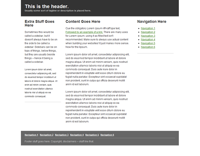
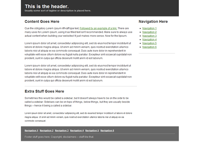
The easiest and best way to setup a website is with well designed layout, a wireframe that let's you plug-in YOUR content whether you are editing with an html editor or a WYSIWYG web editor.
Preview
Preview
The Free Coffee Cup Html Editor offers some free html5 layouts. They are the best I have found to date and, there is no reason why you can't use those layouts in other editors...

Remember, one of our criteria is that our web pages support html5...

You can open these in the Free Coffee Cup Editor with the menu item:
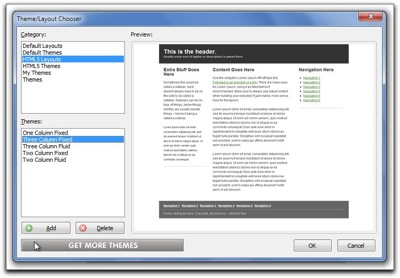
ThemeLayouts
File > New from Theme/Layout

You can use these html5 layouts in any web editor including Blue Griffon.

If the layout isn't what you want, perhaps you need to have your navigation/menus horizontal. You can use Blue Griffon to generate your layout...


Step one (Blue Griffon):


In Blue Griffon you should first set the following in preferences
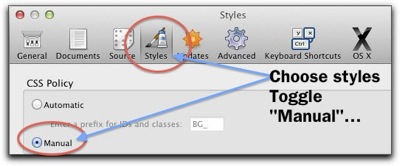
Prefs styles
Menu:
Mac: Blue Griffon > Preferences
PC : Tools > Preferences


Step 2 Blue Griffon:

File > New wizard
First panel Choose xhtml5
Next panel (Continue to General document properties)
Fill out Title, Author, Description (what your web page is about  in a  paragraph) Key words (separated by a comma),  Language (American English), Characterset: Unicode (UTF-8) (continue to Colors and Background)
Leave alone (click Continue)
Document Background (Leave alone, Click Continue)
And here we are At Page Layouts
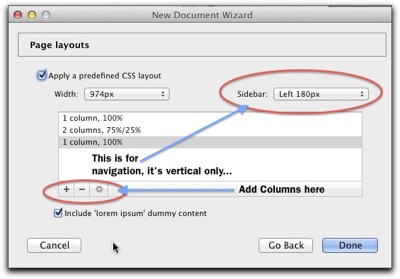
Page Layouts


You'll need to experiment a bit to get what you want,
The results The set up at the left yields a page that looks like this...


There are other layout generators… (all on line wizards) These are the best… give them a try! You'll like one of them!

 Turns out Blue Griffon uses a simpler version of the YUI Development module (Yahoo User Interface) More control here!
A more robust layout generator can be had  at CSS Creator
And, here's another one called CSS Layout Generator
All of these will work in any web editor. Amazing what neat tools you can find on the internet!
Have fun filling in your content and building your home index web page!
Have a really nice long week end!

Wednesday, May 09, 2012

Welcome to How To Build a Website!

Our Objective

  • To build a web site consisting of at least 3 web pages.
  • Acquire a domain name
  • Sign up with a HOST

How?

Discussion
Domain Names and registration
Signing up with a host

Domains and Hosts

What's the most important "THING" on a web page? What are the main parts of a web page?

Can you List them?

Write THEN CHECK OUT THIS LIST...

How do you put a web page together?

  1. The Content First
    • Create it with a text editor
    • Later we will mark it up with xhtml/html5 in your web editor
  2. The Layout
    • Will be Created with CSS3 in your web editor
  3. The Style
    • Will be Created with CSS3 in your web editor

Web Page Creation: The Preparation

You'll need 2 folders on YOUR flash drive and/or Home computer

  1. Make a "Master" website folder
      1. Name it with "Your name" something like "Garry-MasterWebsite"
        1. This folder only contains the files that makes your website work.
      2. And Make A "Webstuff" folder.
        1. This folder will contain the parts you collect to make your website...
          1. Things like, IDEAS, Text files, widgets, lists of links, graphics, pictures, videos... etc...

    Web browsers

    Here's a list that links you to web browser publishing sites Download all the browsers! Install them!

    The Web Editors

    If you already have a Web Editor, by all means, use it! The following is a link to a web page that discusses the various kinds of web editors and give you some choices. The goal here is to find a web editor that you like, and that will help you build your web site. The Web Editors

    Homework:  Write the most important part of your web pages

    The Content
    Always write the content first as plain text with no formatting.

    You'll find some ideas at this web page that will help you "layout" your web page. Lesson 1: Penciling it out!


    Most of all have fun! Get stuck, send an e-mail…

    Navigation Links

    • Week 1 (That's this page on my web site at the bottom of the page you'll see an RSS News feed that displays links to the last 5 articles on the class website blog)
    • Home   (Class Portal page)
    • Lesson 1 (Interesting stuff)
    • Domains and Hosts Resources 
    • Contact

    Vocabulary 

    URL
    ---Uniform Resource Locator
    HTML & CSS
    --- HTML, Hyper Text Markup Language, creates the content of a web page.
    --- CSS, Cascading Style Sheets, Creates the Styling for a web page.
    Provider
    --- Physically links your computer to the Internet.
    Host
    --- Provides the Computers (servers) to store and host your web site on the internet.
    Domain Name (Server) (DNS)
    --- makes a recognizable name for the actual numerical Internet address.
    Got a question? 'Holler!

Monday, October 24, 2011

WYSIWYG --Visual Web Editors

Is there a way to edit a web page directly without using an html text editor? Is there a way to design a web page visually?

The answer is, YES! Sometimes a visual editor is real handy to have  around!

If you have purchased the Coffee Cup HTML Editor, you'll discover that it comes with a visual editor. You might not notice it as it might be "turned off!"  I found this "Faq" on the Coffee Cup web site.

Visual Editor Tab not displaying at all.

Solution: With the update to the latest version of the HTML Editor, the Visual Editor has been turned off by default. We did this to provide the best possible user experience. But don't fret — this is an easy issue to fix. To re-enable the Visual Editor, launch the Editor and go to the Tools > Preferences > General tab. Once there, uncheck the Hide Visual tab option...

Prefs visual


When you click on the Visual Editor Tab you can edit directly on the web page.

Insert HTML elements just like using a word processor...

Visual ed cp

Give it a try!

Coffee Cup has another Wed Editor that could be better described as a web designer.  It's called Visual Site Designer.

If you are visually oriented this might be a great editor for you.  You can download a free trial from Coffee Cup's web site

3207-coffeecup-visual-site-designer1.jpg


If you have a Mac (or a PC) you can try the Open Source program Kompozer (It's Free)

Click the link below to start the Download and give it a try.! Load a web page and start adding your content directly on the web page!


Kompozer


There is other software, noteablely Adobe's  Dreamweaver, but this class is not about web editors, it's about  creating a web site!

Web Editors are our tools of the trade!

Got a question,? 'Holler!


Wednesday, April 28, 2010

Finding Web Page Editing Nirvana

Is there an easier way to make and edit web pages???

I think the WYSIWYG (What You See, Is What You Get) Open Source Web Editor Komposer is a great place to start making web pages, especially if you are just starting out. It's available for PC, Mac and more... There are better alternatives but they are NOT all free or open source like Kompozer. The best part is that Kompozer is currently being updated.

Several many years ago (once upon a time?) there were only a few solid web editors. Today there are many more choices and the competition is growing...

The combination that I use on my Mac are
Smultron, Komodo Edit, Kompozer Coda and Dreamweaver
For the specific task of making photo web galleries I have used iWeb, Lightroom and JAlbum.
In the past I tried Shutterbug (Mac) and Picasa (pc).

JAlbum is free, it's available for PC and Mac. It's a great web album utility and time saver, you can check it out and download it from here...
http://jalbum.net/

Here's a sample JAlbum Gallery

The reason I like the following programs is that I have existing web pages to edit, some of the web editors out there cannot load and edit straight html pages!
These 'Graphical" editors use an intermediate step... between html text editors and wysiwyg editors... they save the Web pages/projects in their own format... Then, when you upload to the web these programs convert their graphical formatted versions to html!

These editors can load and edit HTML pages
Komodo Edit (an HTML ope source and free editor) for PC and Mac
For PC's
The CoffeeCup HTML Editor 2010 ----is 2 Editors in 1 !
http://www.coffeecup.com/html-editor/

TopStyle (this is one terrific CSS/HTML textstyle editor a lot like Coda on the Mac)http://www.blogger.com/img/blank.gif
http://www.newsgator.com/Individuals/TopStyle/Default.aspx

MicroSoft's Web Expression 3 ---The price has come way down...It's now $149.00
http://www.microsoft.com/expression/products/overview.aspx?key=web
(it's a real long download)

Adobe's Dreamweaver CS 5
http://tryit.adobe.com/us/cs4/dreamweaver/index.html?sdid=DOPEY

These Graphical Editors are fun to use but Can not edit existing web sites

A free Graphical Web Editor called WebDwarf (PC Only)
http://www.virtualmechanics.com/products/dwarf/

Kinda fun to use, especially if you are artistically inclined...

it's big brother/sisters are SiteSpinner and SitesSpinnerPro
http://www.virtualmechanics.com/webhelp/sitespinner.html

For Photoshop Users there is a plugin called SiteGrinder
http://www.medialab.com/sitegrinder/

On the Mac there several graphical oriented editors
RapidWeaver
http://www.realmacsoftware.com/rapidweaver/

and
Freeway - Freeway Pro
http://www.softpress.com/products/index.php

And, there are others, but the ones mentioned have caught my attention so far
Oh, so many choices, so little time...

My current main working environment is Coda on the Mac

and I love it!

What you say?

--
Mo Eb , Garry
http://uofgts.com


o "It's the reason we came from the mud, don't you know/'Cause we wanted to climb to the stars." --- David Crosby