The easiest and best way to setup a website is with well designed layout, a wireframe that let's you plug-in YOUR content whether you are editing with an html editor or a WYSIWYG web editor.
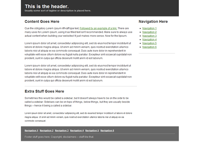
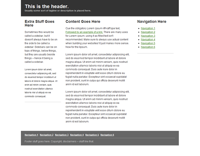
The Free Coffee Cup Html Editor offers some free html5 layouts. They are the best I have found to date and, there is no reason why you can't use those layouts in other editors...
Remember, one of our criteria is that our web pages support html5...
You can open these in the Free Coffee Cup Editor with the menu item:
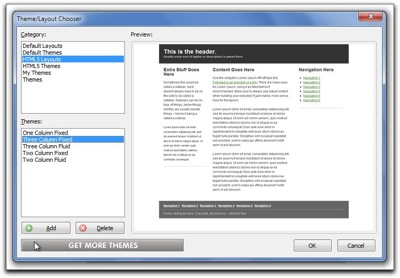
File > New from Theme/Layout
You can use these html5 layouts in any web editor including Blue Griffon.
If the layout isn't what you want, perhaps you need to have your navigation/menus horizontal. You can use Blue Griffon to generate your layout...
In Blue Griffon you should first set the following in preferences
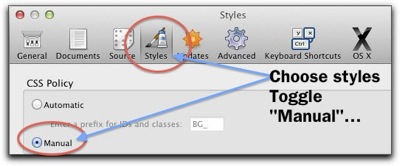
Menu:
Mac: Blue Griffon > Preferences
PC : Tools > Preferences
First panel Choose xhtml5
Next panel (Continue to General document properties)
Fill out Title, Author, Description (what your web page is about in a paragraph) Key words (separated by a comma), Language (American English), Characterset: Unicode (UTF-8) (continue to Colors and Background)
Leave alone (click Continue)
Document Background (Leave alone, Click Continue)
And here we are At Page Layouts
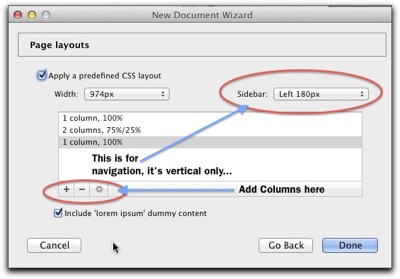
You'll need to experiment a bit to get what you want,
 The set up at the left yields a page that looks like this...
There are other layout generators… (all on line wizards) These are the best… give them a try! You'll like one of them!
Turns out Blue Griffon uses a simpler version of the YUI Development module (Yahoo User Interface) More control here!
A more robust layout generator can be had at CSS Creator
And, here's another one called CSS Layout Generator
All of these will work in any web editor. Amazing what neat tools you can find on the internet!
Have fun filling in your content and building your home index web page!
Have a really nice long week end!
The Free Coffee Cup Html Editor offers some free html5 layouts. They are the best I have found to date and, there is no reason why you can't use those layouts in other editors...
Remember, one of our criteria is that our web pages support html5...
You can open these in the Free Coffee Cup Editor with the menu item:
File > New from Theme/Layout
You can use these html5 layouts in any web editor including Blue Griffon.
If the layout isn't what you want, perhaps you need to have your navigation/menus horizontal. You can use Blue Griffon to generate your layout...
Step one (Blue Griffon):
In Blue Griffon you should first set the following in preferences
Menu:
Mac: Blue Griffon > Preferences
PC : Tools > Preferences
Step 2 Blue Griffon:
File > New wizardFirst panel Choose xhtml5
Next panel (Continue to General document properties)
Fill out Title, Author, Description (what your web page is about in a paragraph) Key words (separated by a comma), Language (American English), Characterset: Unicode (UTF-8) (continue to Colors and Background)
Leave alone (click Continue)
Document Background (Leave alone, Click Continue)
And here we are At Page Layouts
You'll need to experiment a bit to get what you want,
The set up at the left yields a page that looks like this...There are other layout generators… (all on line wizards) These are the best… give them a try! You'll like one of them!
Turns out Blue Griffon uses a simpler version of the YUI Development module (Yahoo User Interface) More control here!
A more robust layout generator can be had at CSS Creator
And, here's another one called CSS Layout Generator
All of these will work in any web editor. Amazing what neat tools you can find on the internet!
Have fun filling in your content and building your home index web page!
Have a really nice long week end!


