Saturday, June 12, 2010

We have a comet...

...visiting us!


Comet C/2009 R1 (McNaught)

You gotta get up really early though around 3 am. It'll be low in the NE about 20 degrees above the horizon June 12 - 13

To make it easy for you to find I made some star maps using Starry Night Pro
The first step above is June the morning of June 13... The next step is June 18th...

This is June 23

and finally June 29


There are some nifty photos available at Sky & Telescope

and Astronomy Magazine

It's just becoming visible to the naked eye now (It's already 2x brighter than predicted) and it's expected to reach a magnitude of about +2  (About the brightness of the pointer stars in the Big Dipper and the bright star Caph in Cassiopeia) Capella in the diagram has a magnitude of -1.8 (It's the third brightest star in the Northern Hemisphere)

Have fun with your binoculars and digital cameras... Comet McNaught promises to be real bright!


Friday, June 04, 2010

Wrap up ---The Class is Over, Now what?

Some suggestions

SEO Page update

I have finished updating the SEO (Search Engine Optimization) Page http://uofgts.com/BasicWD/Class8-SEO.html and have added some links for link checkers...

Apple Vs Adobe... HTML5 vs Flash debate


This will continue to be a subject of interest to all web designers and web builders.

This is Apples stand, with html 5 example web pages. HTML 5 and Web Standards

Here's a view that supports Adobe's Flash. HTML5 vs. Flash: The case for Flash

Find a Web Editor you like

Most software companies allow up to 30 day trail periods for their software... Try them ALL out!
You'll find links here...

http://stasiuk.blogspot.com/2008/10/web-page-editing-nirvana.html


Keep checking with Kompozer, it keeps getting better..
If you haven't done so yet, Check out Coffee Cup's HTML Editor 3 in 1 Editor, it's probably the best value for the dollar... except it's PC only --so far!


Subscribe to the latest News/blogs, Take On-Line Classes

The following web sites are my favorite sources of information. They offer free classes, tutorials, resources,
newsletters, the latest web news... join up, book mark these web sites!

http://www.sitepoint.com/blogs/?source=homepage

http://www.smashingmagazine.com/

http://webdesign.about.com/gi/pages/stay.htm

http://www.sitepoint.com/newsletter/

Free CSS Videos

Speaking of the latest news sitepoint.com is offering a free CSS video series for the next 7 days... They have been charging $7.95 per video... Sitepoint.com often offers really good deals, a good reason to subscribe to one or more of their services...

Lurk on Forums

An Internet forum, or message board, is an online discussion site about specific subjects or software. Members share information, and seek solutions to problems with the subject matter or specific software.
At some point you will be able to contribute to the forum by answering someones question!

http://w3schools.invisionzone.com/

http://www.sitepoint.com/forums/

You can find forums on just about any subject... just do a google search.

But, most of all, just build web sites

practice, practice, practice


and if you have a question, 'holler!


Wednesday, June 02, 2010

Create A Web Site -Search Engine Optimization

Howdy
I've updated the SEO page. You can find SEO info here
http://uofgts.com/BasicWD/Class8-SEO.html

See you in class

Tuesday, June 01, 2010

Create A Website --Ecommerce

I have updated the class web page dealing with online shops and transactions...

It is a bare outline as this subject has many solutions and aspects to it...

If you have specific questions about e-commerce, please bring them to class


You'll find the web page here...
http://uofgts.com/BasicWD/Class8-Ecom.html

The Search Engine Optimization page is also being changed. You'll find that page here http://uofgts.com/BasicWD/Class8-SEO.html

Friday, May 28, 2010

Some Notes...

The Google Docs Forms

What I like about the "doc" forms is that when you fill out the form you the user, can see the current results (if that feature is turned on) right away!

Formresponse.jpgcurling.jpg

So fill out the form and check out the results!!!

I added a response from our curling club questionnaire --So you can see a pie chart example (we are thinking of starting up a summer league and we need volunteers to help with the setup)!

Search Engines

This is the link to find The Google Search Engine creator...


This is the link to find The BING! "wizard"

You'll note that the "behaviour" for these engines is to NOT display the search results on a separate web page in your browser. This technique keeps your clients "at" your website! With all of the links that you use on your web site you should always be asking your self, how do I present the results to my clients so they aren't steered away from your web site...

Bing! pops up the display in a box above your current web page...

BingSearch.jpg

Google Search gives you some alternatives, including where on the web page you want the results to appear... However, some of the effects will only work if you use an HTML 5 doctype...<!DOCTYPE html>. But, don't let that stop your from using the "new" Google search engine!


Googlesearch.jpg

Have fun installing search engines on your web pages...


Thursday, May 27, 2010

Create A Website --More Google Goodies, fonts! --

Our Cup runneth over...

Yes, google , it seem plans to take over the Universe, well at least the known web Universe... You can now use Google Fonts! As a friend of mine says, "You can never have enough fonts!"

Here is the url to find everything you need to know about the Google Fonts

here's a few fonts

listfonts.jpg

You can check out the layout

specimen.jpg

---have fun with google fonts!

Create A Web Site --- Site Search Engines ---

Google again...

Create your own custom search form...
The URL is http://www.google.com/cse/
If you are subscribed to Ad Sense, you can add that to the results page...and more. This is the selections you can make...


I was hoping that an actual search engine could be placed here... Look for it on the class web site... Times are a changing!
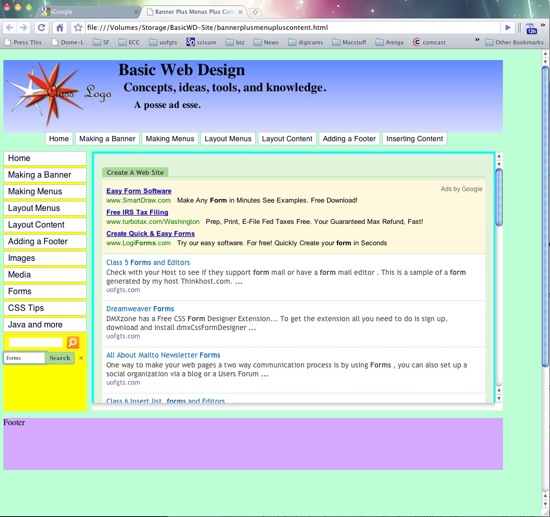
Screen shot 2010-05-27 at 12.31.43 AM.jpg

previewsearch.jpg

Wednesday, May 26, 2010

Create A Web Site -- Google Docs -- Forms!

This changes everything

I made this form at Google Docs.

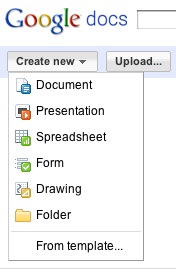
Google Docs CreateNew.jpg

Just select Create New ---> Forms

Fill it in, enjoy the fun!


Monday, May 24, 2010

Create A Web Site --The HTML 5 Video tag

What's the big deal?

Simply this...


If you don't see any video, you don't have an HTML 5 capable browser!
<video width="320" height="180"controls preload="none" > <source src=
"sweeping/sweeping-iPhone.m4v " 
type="video/mp4" />< !-- WebKit video (Safari / Chrome)   -->
<source src="sweeping/sweeping-iPhone.ogg
" type="video/ogg" /><!-- Firefox / Opera -->
</video>
That's it! The hard part was converting the mpg4 file to Ogg Theora format for Firefox! You don't need video players, they are built into the browser!
Makes embedding video on a web page real easy!


Create A Web Site --Inserting Media

Update

I have updated the class "Inserting Media" web page... It should make a little more sense now... The key features are, How to insert slideshows and videos from sources like Picasa Web Albums, Flickr and U-Tube.

There are also examples and embed markup for wmv, quicktime, and flash files,  that you can use. (Embedding video without players) Look at the source, instruction is commented in the source...just cut and paste!


Two NEW Tools for Embedding Video and Slideshows

Visual Lightbox Here's a test slideshow made using the "free" version Nebulae

Video Light Box Here's a test video made using the "free" version Curling

Questions?

'holler

Saturday, May 22, 2010

Create A Web Site -Tip! Backup, Backup, Backup!

Back it up! Hard Drives Can Fail!

images.jpeg
Yep, I was going to write a different article today! But, the hard drive that has the class web site master files in it was missing in action, the entire hard drive had not mount!ed!  I had backed up the master folder on Wednesday before the class... so I wasn't missing any data... just the entire 122 giga-byte external hard drive had vanished. So, if you haven't backed up your master web site folder and all the material you have collected for your web site, now it the time to do so!  Yes, this is mandatory homework!  You ask, Backup? Where? How?

Another Hard Drive

1. An internal Hard Drive

    If you have a Desk Top Computer there is usually room inside for a second hard drive.  The cost of an second internal drive is between $50 and $100 dollars. For that price you can get up to 2 terabytes of storage space!!! They are easy to install, but if the thought of opening up your computer frightens you... go to step 2.

    2. An external Hard Drive

    images-1.jpeg These days you can buy 1 to 2 terabyte drives that come in their own enclosure for $100 to $200. Just plug in the power supply, the usb cable and away you go!  Most of these drives come with backup software, some of these drives have a button on them that when you press it, your data gets backed up... automatically! The smaller "portable" drive are more expensive with less storage space but they are built to survive a 4 foot drop!

    3. The CD/DVD/BluRay Burner

    NewImage.jpg Most computers come with a CD/DVD Burner installed. They works like a hard drive, but when you burn a CD or DVD or the new kid on the block, a BluRay disk, data can't be copied to them anymore.  These disks are like the box of "film" negatives you have in your "attic"... Once the film has been exposed you can ONLY copy from them! So actually CD/DVD/BR disks are a permanent record of your data...  You can buy 100 CD's for about $15 these days and $25 gets you 100 dvd disks. BR disks are quite a bit more expensive at $10 per disk. You can buy these burners for internal or external use. I call them burners as they use a laser to etch pits into the dye on the disks, the 0's and 1's that make up your data!

    Back it up to a cloud!
    On line Backup Services
Providers
Comcast offeres 2 gigabytes of free storage
Quest offers 2 gigabytes of free storage

    MOZYHOME Offers 2 gigabytes for free... (More than enough to backup your web site!) Carbonite $55 per year Unlimited storage Top 10 Reviews Here's a comprehensive review of online storage companies. If you are a geek check out Amazon.com's S3 On-line Storage.
    Google  GDrive It will actually be part of Google Docs. You'll be able to upload any file up to 250 megabytes in size and share it with others if you wish. There will be a 25¢ (?) charge per gigabyte above a free limit. It's being rolled out now and should be available within the month.
     MicroSoft SkyDrive  "SkyDrive" features 25 gigabytes of free storage
Free is Good, Backed up is better...

Your Backup Bottom Line
More soon

Thursday, May 20, 2010

Centering an Image on a web page

It's harder than you think...
You want to place a "box" and an image on a web page. AND, you want them centered.

Method #1: Absolute, Auto and 0 (zero)

Make the Box and the image have the property and value position: absolute; and Use Margin: auto; but set the Top, Right, Bottom and Left positions to 0 (zero). Check out the embedded source!

Check to see if this works in all browsers!

Method #2: The 50% Solution


Using Absolute, 50% Percent and subtract 1/2 (50%) of the width and height of the image
Make the Box and the image have the property and value position: absolute; set the Top, Right, Bottom and Left positions to 50% and subtract from margin-top, margin-right, margin-bottom and margin-left 1/2 (50%) of the width and height of the image in pixel units. Check out the embedded source!

Method #3: Display Block


Tricky... The key to centering an image on a web page is that by default an image is an inline element.


"Inline Elements always begin on the same line. Height, line-height and top and bottom margins can’t be changed. Width is as long as the text/image and can’t be manipulated!"
Unless you change the image to act like a block element using the Property and Value display:block;


You could put the image in a div, but why add a div when you don't need it?


Click on the above images to see the actual web pages. PLease report if the above works in your browsers!  Thanks

Sunday, May 16, 2010

Layout Different Perspectives


XHTML Tags
This view was inspired by the WYSIWYG web editor Kompozer, Dreamweaver also has a similar tag display view...
layout-tags.jpg

I added the </div> close tags. Visually you can see that everything is in the <body> and the web page parts are contained inside the wrapper...
Here's another way to view the same layout...
xhtml-layout.jpg
Need a grid to help with your layouts? I found this at smileycat.com. Right click on the grid to download it... It's a png file, just load it as a background image for the body of your web page.

layout_grid.png
Interesting...

Saturday, May 15, 2010

The rest of the layout

Adding space for content and the footer...

The Content

When we define the height and width of our content area the normal flow of the xhtml, as interpreted by any browser, will place the content below the vertical menus...  I used  arbitrary background colors to let us see the different components positions.
To position the "content" div on the page all we need to do is move it from its relative position by using top and left dimensions...
The position of any div is measured from the top left corner...

The Footer

Same as the content... we'll have to move it from it's "normal" flow or position to place it at the bottom of the navigation and content columns.

The page

You'll notice that the page is "glued to the left side of your browser, you might not notice that if you are using a 4:3 old style monitor. But, you'll see that right off on a wide screen 16:9 monitor!

The Puzzle for the day?

Center the web page. (yes, we are ignoring the "content" of the "content div" for now!)
Click on the Image below to load the page into a browser
Screen shot 2010-05-15 at 1.15.10 PM.jpg

Friday, May 14, 2010

Adding Menus to our banner page

Continuing our Layout for our Class Web Page

We diverted our attention after we constructed our banner to learn different ways of making navigation elements for a web page. I used Ian Lloyd's accessify.com's  "List-O-Omatic" to make some menus for our demo class web page...
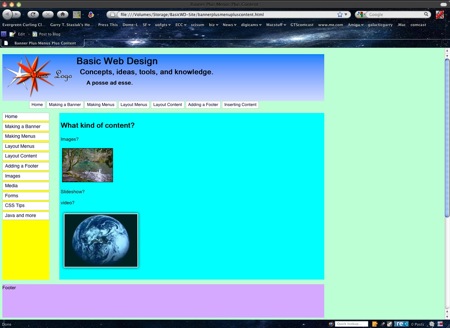
double click on the image of the page... to look at the source... I made comments where I made some changes to the List-o-matic markup...
Screen shot 2010-05-14 at 11.43.22 AM.jpg

The Vertical Menu

I rarely use position absolute to place an item on a page unless I must... In this case, in order for the sub-menus to not interfere with the layout of the rest of the page, the drop down menus, must be on top of all the other items on the page...
So I put the menus in a div, named it id ="horizontalmenu" and then positioned it absolutely.  How did I center the menus?
Try and puzzle it out... then Look at the source!

The Horizontal Menus

List-o-matic can't make horizontal sub menus, so the submenus are just more list items... (It's possible though). To position the horizontal menus I had to use position relative to move the list down so that the vertical menus didn't cover up the horizontal menu...
Adding your main content is next...
I found this very interesting web page that let's you make your own layouts...
It's called YAML Builder, "Yet Another Multicolumn Layout"
Have fun!  More soon!

Thursday, May 13, 2010

Photoshop Elements Deal, May 13, 2010 ONLY

I found this on Mike Johnson's Blog, The Online Photographer

Adobe Photoshop Elements for $34.99

Amazon's Gold Box Deal of the Day today (in the U.S. only) is Adobe Photoshop Elements 8 for Mac or PC for $34.99 after mail-in rebate.

Elements has always been a somewhat strange product to me...it's Photoshop with some key features missing, but it's still loaded with complexity and isn't optimized strictly for photographers. It's cheap today, though. A tip: Elements is a nice, inexpensive way to get the latest version of Adobe Camera Raw (ACR) if your older version of Photoshop doesn't support it.

Mike


Create Web Site 2 --Week 1 Homework

Please Fill out the Form...

You'll find a form at this URL

It's a class Survey, your participation will help the direction the class takes...

You should be able to solve Puzzle 5 by adding one line to the CSS!

Poke around the web pages that are linked on the page at the above URL... You'll find a bunch of interesting web ideas!

Got a question, Post a Comment!


Wednesday, May 12, 2010

Be a TV Star!

Howdy

You are invited

Howdy
Seems Clark College wants to make a commercial with me demoing Photoshop as part of the whole commercial

I need and Clark College needs some volunteers to participate in the commercial!  

It will be "shot" (filmed) at CTC (Clarl Technology Center) between 1-3 on Saturday, May 22.  Cast call is at 12:45 PM 
in room 339


I've been told that you (the  volunteers) to not to wear bright colored or white clothing.  Also avoid logos or insignias on the clothes


From Vancouver: 
Take State Highway 14 east to the 192nd Ave. exit. Turn left (north) on 192nd Ave. to Mill Plain Blvd. Turn left (west) on Mill Plain Blvd. and travel approximately one block to Clark College at Columbia Tech Center. The building is on the right (north) side of the road. 

Or just go east on  Mill Plain ...  the building is on the left, below Walmart and across the street from Lowes  BTW (Google Maps - Street View shows a hole being dug in the ground where the College and Lowes is today)

CTCmap.gif
Got any questions 'holler
Want to participate, send that e-mail

Monday, May 10, 2010

Create A Web Site ---CSS Styling


Think inside the box...
To style your web site you NEED to use CSS.  With CSS you can style any xhtml element, AND any thing you name as a "class" or an "id"...
What kind of styles can you apply to an element or an id or a class? On the Class CD there are two file folders. One is labeled CSS and the other is labeled xhtml It looks like this on the CD

Screen shot 2010-05-10 at 1.57.03 PM.jpgXHTML and CSS Cheat Sheets


They are cheat sheets, that list all the  CSS properties, and HTML attributes that you can use...

In depth references

To begin learning CSS you need good resources.  There are 2 that are on-line...

1. W3Schools CSS Tutorial

This set of tutorials has a nifty  "try it" feature... it looks like this

w3schools try it set up for CSS

You start off with their example, to see what the CSS Rule looks like... then you can edit the style Rules on the left and see the new results on the right. Real Nifty!


2. Sitepoint.com CSS Reference

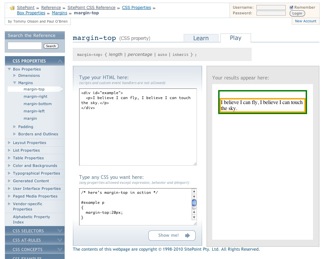
Sitepoint also has a "try it" section called Learn and Play Where you can see what the sample looks like and you can change the CSS and immediately see the results... it looks like this... More nifty...


Site point learn and play interface


All of these references can help you learn the CSS Rules and the many different properties you can use to "style" your content!

Codeburner

You can put a reference interface on your desktop called "Code Burner" It links to all of the sitepoint.com's online references.

You can find the link for the CodeBurner "apps" here at sitepoint.com's website. Download and install the widgets on your desktop!


Screen shot 2010-05-10 at 2.14.05 PM.jpg

Some Tips

When you are starting to learn CSS styling and layout it is much easier to start with  "Starter Templates"

You can find a bunch of them here...

Layout Gala

Fixed width Layouts

*** Practice, practice, practice ***

good luck and when all else fails 'holler!

Wednesday, May 05, 2010

Create A Web Site --Tidy Loose Ends

Tidy

Having problems with your XHTML?  Got some really old pages that need lots of help Got some pages that need to be updated... Use TIDY!


This Link will take you to Tidy Online

http://valet.htmlhelp.com/tidy/

You can upload your file using the "Choose File" button, select convert html to Xhtml and then

Click the "Full Report" Button

You can highlight and copy the "tidied" results and paste it into a blank page in your editor... save the page with a new name...

This link takes you to another online version of TIDY

http://infohound.net/tidy/

With this version you can upload a file or tidy a page that has been uploaded to a server.

Have fun...

scrub, scrub, scrub and then Validate your pages!