Saturday, August 27, 2011


Tuesday, May 03, 2011
Week 5 -- Review
Making Web Pages and a Web Site
Now you know that making a web page and a web site involves many different things...
Having a good Web Editor really helps. I hope you have found the free Coffee Cup HTML editor useful.
Web Page Layout Using CSS
CSS layout uses the "Box Model" to "contain" the major parts of a web page.

But, just because we call it the box model, doesn't mean that a web page has to look "boxy!" This web site, the Zen Garden shows how the same content can styled differently! You can see a collection of the different styles here! Here's a couple of thumbnails that will give you the idea... there are hundreds of examples at the above link.


However, building a layout can be tricky as we have to apply "Position Rules", to move elements into different positions.
To speed up your web page building, you can start out with a basic preset CSS layout. I have found the following preset CSS layouts at http://www.code-sucks.com/ to be quite useful, On this web page I compare the differences between the two kinds of layouts, Faux and Fixed... Basic Preset CSS Layouts
CSS Layouts are a good way to start building a web page and site ... the links on the basic preset css layout page will take you to the code-sucks.com web site CSS layout pages. You'll find a variety of layouts from single to four columns, headers footers and spaces for navigation and footers. Choose a preset that fits how you want your web page to look, oops, to be layed out!

Sample look of layouts
Fill in your content in the appropriate spaces... then add the styling!
The possibilities are only limited by your imagination!
If you do a Google search for CSS Layouts you will find many, many more CSS Layout possibilities...
Good Luck, Have fun and
Practice, Practice, Practice
and if you need help or have a question, just 'holler
Garry Stasiuk
Wednesday, April 20, 2011
Week 3 Review -- Building Menus
Now that we have finished building the banner for a web page (Banner Tutorial) we need to add our Navigation Menus.
On the web page that we are building, we are now ready to add the menus. You can start, as we did in class, using the menus generated by Ian Lloyd's "List-o-matic" at accessify.com. You can choose Horizontal Menus or vertical menus.
I added both to the following web page. To see the steps read the pages "Source" in your Browser (Usually menu item: View > Source.
This is the link to the actual page you see below
Read the source to see how a vertical list was made to line up in a line horizontally...
You, can find more info about how Navigation menus work, samples that you can use and other places on the web where you can build fancy custom menus or download free menu generators. More Menu Tutorials Don't forget to read the commented source.
Finishing your home web page.
1. Adding the Content
2. Centering the web page in a browser (read the source)
Questions? Send that e-mail!
On the web page that we are building, we are now ready to add the menus. You can start, as we did in class, using the menus generated by Ian Lloyd's "List-o-matic" at accessify.com. You can choose Horizontal Menus or vertical menus.
I added both to the following web page. To see the steps read the pages "Source" in your Browser (Usually menu item: View > Source.
This is the link to the actual page you see below
Read the source to see how a vertical list was made to line up in a line horizontally...
You, can find more info about how Navigation menus work, samples that you can use and other places on the web where you can build fancy custom menus or download free menu generators. More Menu Tutorials Don't forget to read the commented source.
Finishing your home web page.
1. Adding the Content
2. Centering the web page in a browser (read the source)
Questions? Send that e-mail!
Thursday, April 14, 2011
Week 2 Review -Building a Web Page
1. Some Simple Rules
Before we begin we need to follow the "rules" for xhtml (Formatting your content)
and Styling the content with CSS
The Basic xhtml Rules
Please read about the basic xhtml rules on the class website
The Basic CSS Rules
Please read about the basic CSS rules on the class website
2. Building A Web Page - The Banner
I put together a step by step tutorial, it begins by building your web sites banner.
All the parts necessary to build a "demo" web page are in your "master" web site folder.
This is the link where you will find The class "Build a page tutorial -Part 1, The Banner"
There are 7 steps
There are 7 steps
Have Fun! I'll be going over the rules and tutorial steps in the class, and then we'll advance to Part 2, building the navigation menus.
Got a question,email me or if you are ready for part 2, I'll send you the link.
Wednesday, April 13, 2011
Week 2 Review -Preparing and using Images
The use of images and background graphics on a web page can make a big difference on how the page stands out and shines.
Images can be placed on a web page using the image tag, or as a CSS "background-image"
In order for a web page to "load" quickly the images need to be reduced to the 'size' they are used on the page.
If you are not working with an artist/graphics person, you'll need to make your own images, backgrounds, graphics, logos, and take your own photographs.
You can certainly use a program like Adobe's Photoshop, but, there are other FREE alternatives.
If you need a Photoshop like program you can use some free on-line (edit in a browser) programs.
I like Sumo Paint http://www.sumopaint.com/home/
You can use SumoPaint to make logos, gradients and other graphics.
On the class CD you'll find these graphics, they were made quickly in Sumopaint


One of the graphic elements that you need to generate are thumbnails for your photos or, if you are making a "Shopping Cart" you'll need smaller images of your products. A stand alone program that can generate thumbnails may be all you need. This FREE (PC) program can also change the file formats of your graphics or photos.
PC Only (free)
Folkes Easy Thumbnails
For more information about making Thumbnails on the class web site read "Making Thumbnails (and Galleries) Doesn't have to Hurt"
Next: Building your home page --starting with the Banner.

Images can be placed on a web page using the image tag, or as a CSS "background-image"
In order for a web page to "load" quickly the images need to be reduced to the 'size' they are used on the page.
If you are not working with an artist/graphics person, you'll need to make your own images, backgrounds, graphics, logos, and take your own photographs.
You can certainly use a program like Adobe's Photoshop, but, there are other FREE alternatives.
If you need a Photoshop like program you can use some free on-line (edit in a browser) programs.
I like Sumo Paint http://www.sumopaint.com/home/
You can use SumoPaint to make logos, gradients and other graphics.
On the class CD you'll find these graphics, they were made quickly in Sumopaint


If you are graphically challenged you can use on-line logo generator to make your logo
This is from Cooltext.com It's a bit out there, but fun! (Click on the lmage below and you'll see what I mean by "out there!)

If you use Google's free Photo Organizer, Picasa, you'll find that Picasa has a direct link to another online Photoshop like program called Picnik It's designed to work with your photos...
You can use the combination to prep your images for your website
One of the graphic elements that you need to generate are thumbnails for your photos or, if you are making a "Shopping Cart" you'll need smaller images of your products. A stand alone program that can generate thumbnails may be all you need. This FREE (PC) program can also change the file formats of your graphics or photos.
PC Only (free)
Folkes Easy Thumbnails
For more information about making Thumbnails on the class web site read "Making Thumbnails (and Galleries) Doesn't have to Hurt"
Next: Building your home page --starting with the Banner.
Tuesday, April 12, 2011
Week 2 Review -Links
Links are what makes the internet work, interactive.
You can link to web documents, such as other web pages, pdf files, photographs, graphics videos and so on.
You can Bookmark, or link to different locations on a web page using an index, especially useful if you have a long web page the "goes below the fold" with different sections or chapters.
You can, with a link trigger and e-mail client (Program) to open with the e-mail address you want the e-mail sent to...
You will find all the information you need to make these kinds of links, along with samples on the Class Website page called Links
Next: Image editing on the Web
You can link to web documents, such as other web pages, pdf files, photographs, graphics videos and so on.
You can Bookmark, or link to different locations on a web page using an index, especially useful if you have a long web page the "goes below the fold" with different sections or chapters.
You can, with a link trigger and e-mail client (Program) to open with the e-mail address you want the e-mail sent to...
You will find all the information you need to make these kinds of links, along with samples on the Class Website page called Links
Next: Image editing on the Web
Wednesday, April 06, 2011
Week 1: Tip Turn on extensions in Windows XP, Vista and Win7 AND Macs too!
Howdy
Almost forgot. It's important that you know the extension of your files, especially for your graphics, photos and movies.
 open the Finder, then choose
Menu
Finder > Preferences
Choose the Advanced Tab
Check the Show all file extensions box
Got a question, send that email!
Almost forgot. It's important that you know the extension of your files, especially for your graphics, photos and movies.
Mac and Windows OS's by default hide the 3 letter file extension for all files... You need to know what they are as the extensions are part of the filename and is needed by ALL browsers so they knows what to do with the file... Here's how you set that up
On Windows XP
- Open My Computer, and select Folder Options from the Tools menu
- Click on the View tab, turn off Hide MS-DOS file extensions for known file types, by unchecking the box
- Press OK.
On Windows Vista
- Go to My Computer and choose Organize > Folder and Search Options
- Select the View tab and deselect "Hide extensions" for known file types
- Press OK.
On Windows 7
- Open an Explorer window and choose Organize > Folder and Search Options
- Select the View tab -- and deselect the Hide extensions for known file types
- Press OK.
To see the above with pictures and arrows go to Indezine.com
Making Extensions visible in OS X (Mac)
 open the Finder, then choose
Menu
Finder > Preferences
Choose the Advanced Tab
Check the Show all file extensions box
Got a question, send that email!
Tuesday, April 05, 2011
Week 1: Setting Up the Free Coffee Cup HTML Editor
Howdy
This video from the CoffeeCup Website takes you through the steps to set up Your website project(s), For our Class the Your "Master-website" Folder on your computer.
After you have copied the "YourWeb-site" Folder to your USB drive, and renamed it. Watch the video and follow the steps.
When you are done with the video the Editor's MY Website Tab, Local Disk, should look like this...

Have fun playing with the free HTML Editor, and working on formatting the content.for your website.
Questions? Send an e-mail
This video from the CoffeeCup Website takes you through the steps to set up Your website project(s), For our Class the Your "Master-website" Folder on your computer.
After you have copied the "YourWeb-site" Folder to your USB drive, and renamed it. Watch the video and follow the steps.
When you are done with the video the Editor's MY Website Tab, Local Disk, should look like this...
Have fun playing with the free HTML Editor, and working on formatting the content.for your website.
Questions? Send an e-mail
Week 1: Homework
Howdy
Step1:
Setting up our work environment
Install at least 3 browsers, Internet Explorer, Firefox and Chrome (You might also consider Safari and Opera)
Install CoffeeCups Free HTML Editor, you can download it from CoffeeCup's Website
Install a text Editor, Notepad2, or Komodo Edit
Install ftp software FileZilla
Step 2:
Setting up your Master "Local" website

From the Class CD Copy the YourWeb-Site Folder to a Flash Drive (USB Stick Drive) so you can work on your site at school or at home or at work!
Also copy the "empty" Website-Parts" folder to your flash drive.
(After you are done with class you can copy the folders to your "My Documents" folder)
Step 3:
Sit down with a pencil and paper and write out / sketch out what you want to put on your home web page (index.html)
Inotherwords the most important stuff on YOUR web page... the content!
I'll follow up in a couple of days on setting up CoffeeCup's Free HTML Editor...
But, if you can't wait --play!
Got a question, Post a comment or send me an e-mail
Step1:
Setting up our work environment
Install at least 3 browsers, Internet Explorer, Firefox and Chrome (You might also consider Safari and Opera)
Install CoffeeCups Free HTML Editor, you can download it from CoffeeCup's Website
Install a text Editor, Notepad2, or Komodo Edit
Install ftp software FileZilla
Step 2:
Setting up your Master "Local" website
From the Class CD Copy the YourWeb-Site Folder to a Flash Drive (USB Stick Drive) so you can work on your site at school or at home or at work!
Also copy the "empty" Website-Parts" folder to your flash drive.
(After you are done with class you can copy the folders to your "My Documents" folder)
Step 3:
Sit down with a pencil and paper and write out / sketch out what you want to put on your home web page (index.html)
Inotherwords the most important stuff on YOUR web page... the content!
I'll follow up in a couple of days on setting up CoffeeCup's Free HTML Editor...
But, if you can't wait --play!
Got a question, Post a comment or send me an e-mail
Monday, April 04, 2011
Week One - A Tip "Write a Good, and Unique Title <title></title> for EVERY web page!"
The W3C Quality Assurance Tips for Webmasters.
The Quality Assurance group has put together a list of items that make a "quality" web page.
At the top of the list is the "best" thing you can do to assure a high ranking by web search engines. The best thing? Write a good <title> for your web pages.
Here it is...
<title>: the most important element of a quality Web page
The <title> element in HTML is designed to provide a short piece of text that should stand for the document in cases such as:
• window title bars
• bookmark lists
• result lists from search services
A good title
So take care to give your page a good title:
not too short
"Section One" won't help much when it shows up in a search results list. Section one of what?. Better: <title>Section
One of the Modern Music Guide</title> or even better <title>Time Frame (the Modern Music Guide, Section 1)</title>
not too long
Because only 60 to 80 characters are displayed in many window titles, menus, etc.; you can give a more detailed/pleasant title in the top level heading of your document, e.g. <h1>Section One: When has the Modern Time Commenced, Musicwise?</h1> (with a link to the whole Modern Music Guide for context).
There are more tips, you'll find them here at The W3C Quality Assurance Tips for Webmasters website.
Friday, March 18, 2011
New Class Begins April 4
Create Your Own Website I
LEARN THE BASICS OF CREATING A WEBSITE.
 |
| Link to Class Web Site |
Apply design concepts and interactive elements to develop a clear, concise and attractive web site that is web standard compliant, (works in all browsers), interactive and is accessible on all mobile platforms. You can also use these techniques to make an epub (electronic book). Learn how build navigation menus and forms that work and how to avoid time-consuming pitfalls while building a web site. Students will build and publish a web site in class as a hands-on case study.
Bring a flash drive to class, and your laptop if you have one..
Pre-requisite: Students should have advanced computer skills and know how to create and copy files, navigate the Web and understand file extensions.
Purchase textbook at the Clark College Bookstore prior to class.
Saturday, June 12, 2010
We have a comet...
...visiting us!

Comet C/2009 R1 (McNaught)
You gotta get up really early though around 3 am. It'll be low in the NE about 20 degrees above the horizon June 12 - 13

To make it easy for you to find I made some star maps using Starry Night Pro
The first step above is June the morning of June 13... The next step is June 18th...


There are some nifty photos available at Sky & Telescope
and Astronomy Magazine
It's just becoming visible to the naked eye now (It's already 2x brighter than predicted) and it's expected to reach a magnitude of about +2 (About the brightness of the pointer stars in the Big Dipper and the bright star Caph in Cassiopeia) Capella in the diagram has a magnitude of -1.8 (It's the third brightest star in the Northern Hemisphere)
Have fun with your binoculars and digital cameras... Comet McNaught promises to be real bright!

This is June 23


and finally June 29

There are some nifty photos available at Sky & Telescope
and Astronomy Magazine
It's just becoming visible to the naked eye now (It's already 2x brighter than predicted) and it's expected to reach a magnitude of about +2 (About the brightness of the pointer stars in the Big Dipper and the bright star Caph in Cassiopeia) Capella in the diagram has a magnitude of -1.8 (It's the third brightest star in the Northern Hemisphere)
Have fun with your binoculars and digital cameras... Comet McNaught promises to be real bright!
Friday, June 04, 2010
Wrap up ---The Class is Over, Now what?
Some suggestions
SEO Page update
I have finished updating the SEO (Search Engine Optimization) Page http://uofgts.com/BasicWD/Class8-SEO.html and have added some links for link checkers...
Apple Vs Adobe... HTML5 vs Flash debate
This will continue to be a subject of interest to all web designers and web builders.
This is Apples stand, with html 5 example web pages. HTML 5 and Web Standards
Here's a view that supports Adobe's Flash. HTML5 vs. Flash: The case for Flash
Find a Web Editor you like
Most software companies allow up to 30 day trail periods for their software... Try them ALL out!
You'll find links here...
http://stasiuk.blogspot.com/2008/10/web-page-editing-nirvana.html
Keep checking with Kompozer, it keeps getting better..
If you haven't done so yet, Check out Coffee Cup's HTML Editor 3 in 1 Editor, it's probably the best value for the dollar... except it's PC only --so far!
Subscribe to the latest News/blogs, Take On-Line Classes
The following web sites are my favorite sources of information. They offer free classes, tutorials, resources,
newsletters, the latest web news... join up, book mark these web sites!
http://www.sitepoint.com/blogs/?source=homepage
http://www.smashingmagazine.com/
http://webdesign.about.com/gi/pages/stay.htm
http://www.sitepoint.com/newsletter/
Free CSS Videos
Speaking of the latest news sitepoint.com is offering a free CSS video series for the next 7 days... They have been charging $7.95 per video... Sitepoint.com often offers really good deals, a good reason to subscribe to one or more of their services...
Lurk on Forums
An Internet forum, or message board, is an online discussion site about specific subjects or software. Members share information, and seek solutions to problems with the subject matter or specific software.
At some point you will be able to contribute to the forum by answering someones question!
http://w3schools.invisionzone.com/
http://www.sitepoint.com/forums/
You can find forums on just about any subject... just do a google search.
But, most of all, just build web sites
practice, practice, practice
and if you have a question, 'holler!
Wednesday, June 02, 2010
Create A Web Site -Search Engine Optimization
Howdy
I've updated the SEO page. You can find SEO info here
http://uofgts.com/BasicWD/Class8-SEO.html
See you in class
I've updated the SEO page. You can find SEO info here
http://uofgts.com/BasicWD/Class8-SEO.html
See you in class
Tuesday, June 01, 2010
Create A Website --Ecommerce
I have updated the class web page dealing with online shops and transactions...
It is a bare outline as this subject has many solutions and aspects to it...
If you have specific questions about e-commerce, please bring them to class
You'll find the web page here...
http://uofgts.com/BasicWD/Class8-Ecom.html
The Search Engine Optimization page is also being changed. You'll find that page here http://uofgts.com/BasicWD/Class8-SEO.html
Friday, May 28, 2010
Some Notes...
The Google Docs Forms
What I like about the "doc" forms is that when you fill out the form you the user, can see the current results (if that feature is turned on) right away!


So fill out the form and check out the results!!!
I added a response from our curling club questionnaire --So you can see a pie chart example (we are thinking of starting up a summer league and we need volunteers to help with the setup)!
Search Engines
This is the link to find The Google Search Engine creator...
This is the link to find The BING! "wizard"
You'll note that the "behaviour" for these engines is to NOT display the search results on a separate web page in your browser. This technique keeps your clients "at" your website! With all of the links that you use on your web site you should always be asking your self, how do I present the results to my clients so they aren't steered away from your web site...
Bing! pops up the display in a box above your current web page...

Google Search gives you some alternatives, including where on the web page you want the results to appear... However, some of the effects will only work if you use an HTML 5 doctype...<!DOCTYPE html>. But, don't let that stop your from using the "new" Google search engine!
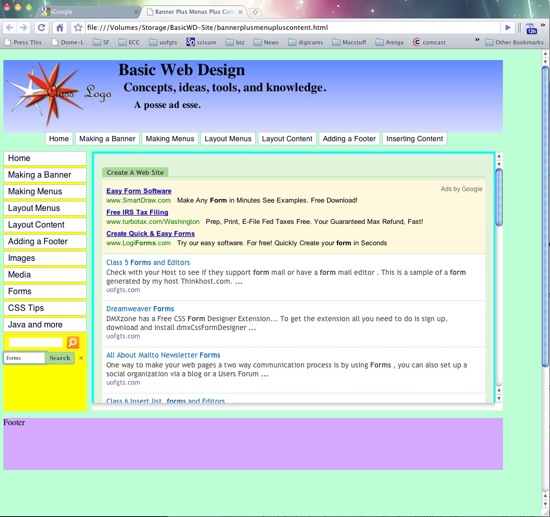
Have fun installing search engines on your web pages...
Thursday, May 27, 2010
Create A Website --More Google Goodies, fonts! --
Our Cup runneth over...
Yes, google , it seem plans to take over the Universe, well at least the known web Universe... You can now use Google Fonts! As a friend of mine says, "You can never have enough fonts!"
Here is the url to find everything you need to know about the Google Fonts
here's a few fonts

You can check out the layout

---have fun with google fonts!
Create A Web Site --- Site Search Engines ---
Google again...
Create your own custom search form...The URL is http://www.google.com/cse/
If you are subscribed to Ad Sense, you can add that to the results page...and more. This is the selections you can make...
I was hoping that an actual search engine could be placed here... Look for it on the class web site... Times are a changing!


Wednesday, May 26, 2010
Create A Web Site -- Google Docs -- Forms!
This changes everything
I made this form at Google Docs.
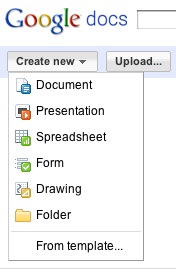
Just select Create New ---> Forms
Fill it in, enjoy the fun!
Monday, May 24, 2010
Create A Web Site --The HTML 5 Video tag
What's the big deal?
Simply this...If you don't see any video, you don't have an HTML 5 capable browser!
<video width="320" height="180"controls preload="none" > <source src=
"sweeping/sweeping-iPhone.m4v "
type="video/mp4" />< !-- WebKit video (Safari / Chrome)   -->
<source src="sweeping/sweeping-iPhone.ogg
" type="video/ogg" /><!-- Firefox / Opera -->
</video>
That's it! The hard part was converting the mpg4 file to Ogg Theora format for Firefox! You don't need video players, they are built into the browser!
Makes embedding video on a web page real easy!
Subscribe to:
Posts (Atom)